
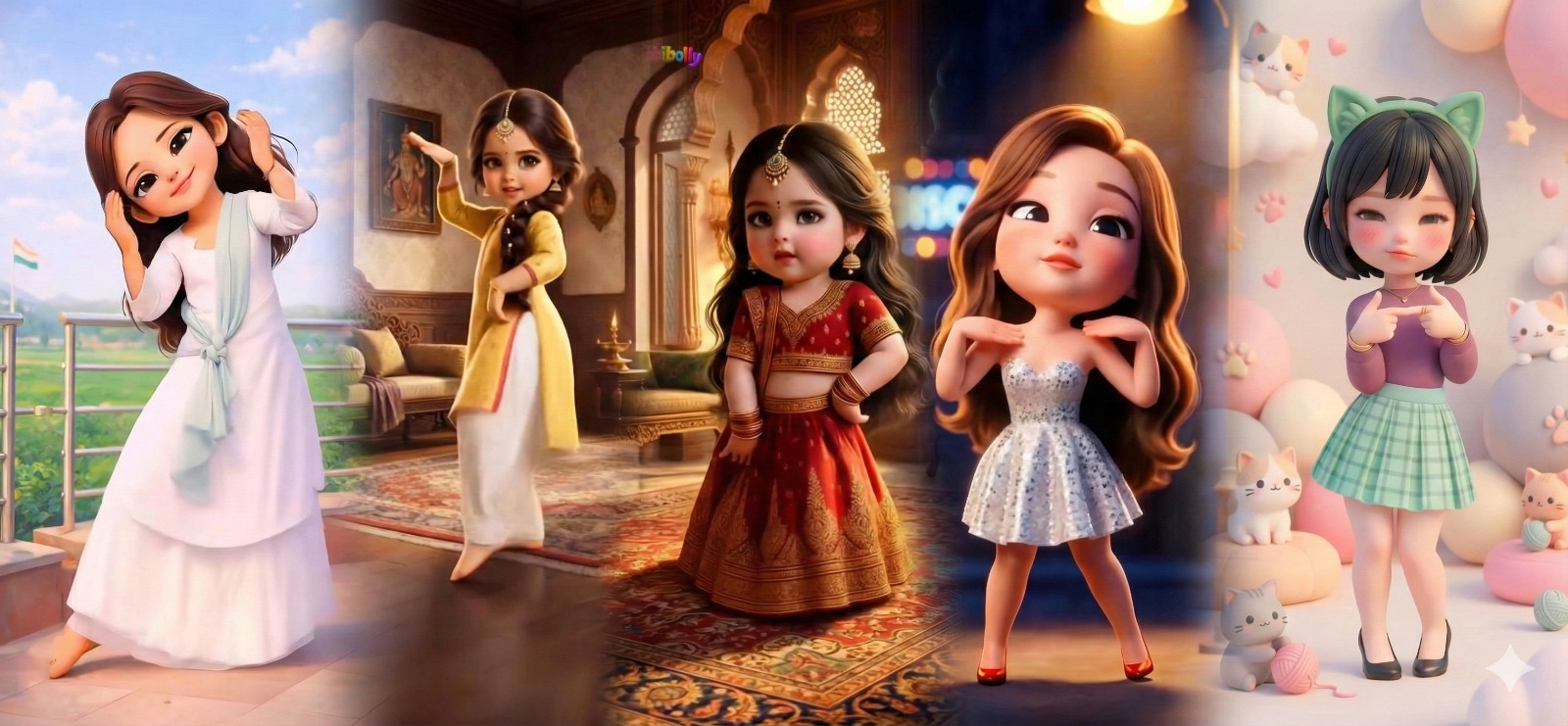
How to Create Viral Doll Dancing Videos for Instagram Using AI (Step-by-Step Guide)
Learn how to create viral doll dancing videos for Instagram using AI tools like ChatGPT, Kling AI, and Wan.video. This step-by-step guide shows how to turn any dance reel into a cute, animated doll video and boost your chances of going viral, no editing skills required.
In recent weeks, cute doll dancing videos have completely taken over Instagram Reels. These AI-generated dancing doll videos are getting millions of views, high engagement, and rapid follower growth.
Disney style doll dancing on bollywood song.
The best part? You don’t need animation skills or video editing experience to create these viral reels.
In this tutorial, you’ll learn how to create doll dancing viral videos for Instagram using AI, step by step.
What Are Doll Dancing Viral Videos?
Doll dancing videos are AI-generated reels where a cute disney style doll copies the dance moves from an original video. These videos look adorable, feel fresh, and perform extremely well on Instagram’s algorithm.
Creators are using tools like ChatGPT, Gemini, Kling AI, and Wan.video to produce these reels quickly.
Step 1: Take a Screenshot from the Original Dancing Reel
- Find a dancing reel on Instagram that you want to recreate
- Pause the video at a clear, front-facing frame
- Take a high-quality screenshot
📌 This screenshot will be used to generate the AI doll character, so clarity matters.
For the purpose of this tutorial, we will be using the following reel.
Step 2: Create a Cute Doll Image Using AI (ChatGPT / Gemini)
- Open ChatGPT or Gemini
- Upload the screenshot taken in Step 1
- Paste the following prompt.
Transform the person in the reference image into an ultra-cute Disney-style baby doll character.
— Prompt for creating doll
Keep the facial features recognizable but stylized:– oversized expressive eyes– soft rounded cheeks– small nose and lips– smooth porcelain-like skin– chubby toddler proportions– short height, big head, tiny hands and feet
Style:– 3D Disney/Pixar-inspired doll aesthetic– chibi baby proportions– extremely cute, innocent, storybook feel– high-detail cinematic render– soft global illumination– shallow depth of field
Outfit:– traditional Indian-inspired baby outfit similar in vibe to a lehenga or festive dress– rich fabrics (silk, embroidery, gold accents)– matching bangles, earrings, tiny jewelry– outfit should be culturally elegant and childlike (not mature)– colors should complement the character’s skin tone
Hair & Accessories:– soft, voluminous hair with gentle waves– cute baby hairline– small traditional accessories (bindi, hair ornament, maang tikka style but baby-friendly)
Pose & Expression:– slightly sassy or innocent baby pose– curious or confident expression– standing naturally like a toy doll brought to life
Background:– generate a background that matches the doll’s vibe– royal palace / warm heritage interior / dreamy fairytale setting– ornate Indian architecture elements– soft golden lighting– cozy, magical atmosphere
Rendering Quality:– ultra-high resolution– cinematic lighting– soft shadows– hyper-detailed textures– studio-quality render– fantasy realism– clean, polished finish
Overall Mood:– adorable, wholesome, magical, Instagram-viral– looks like a luxury Disney baby doll collectible
Within seconds, the AI will generate a cute doll-style version of the character.
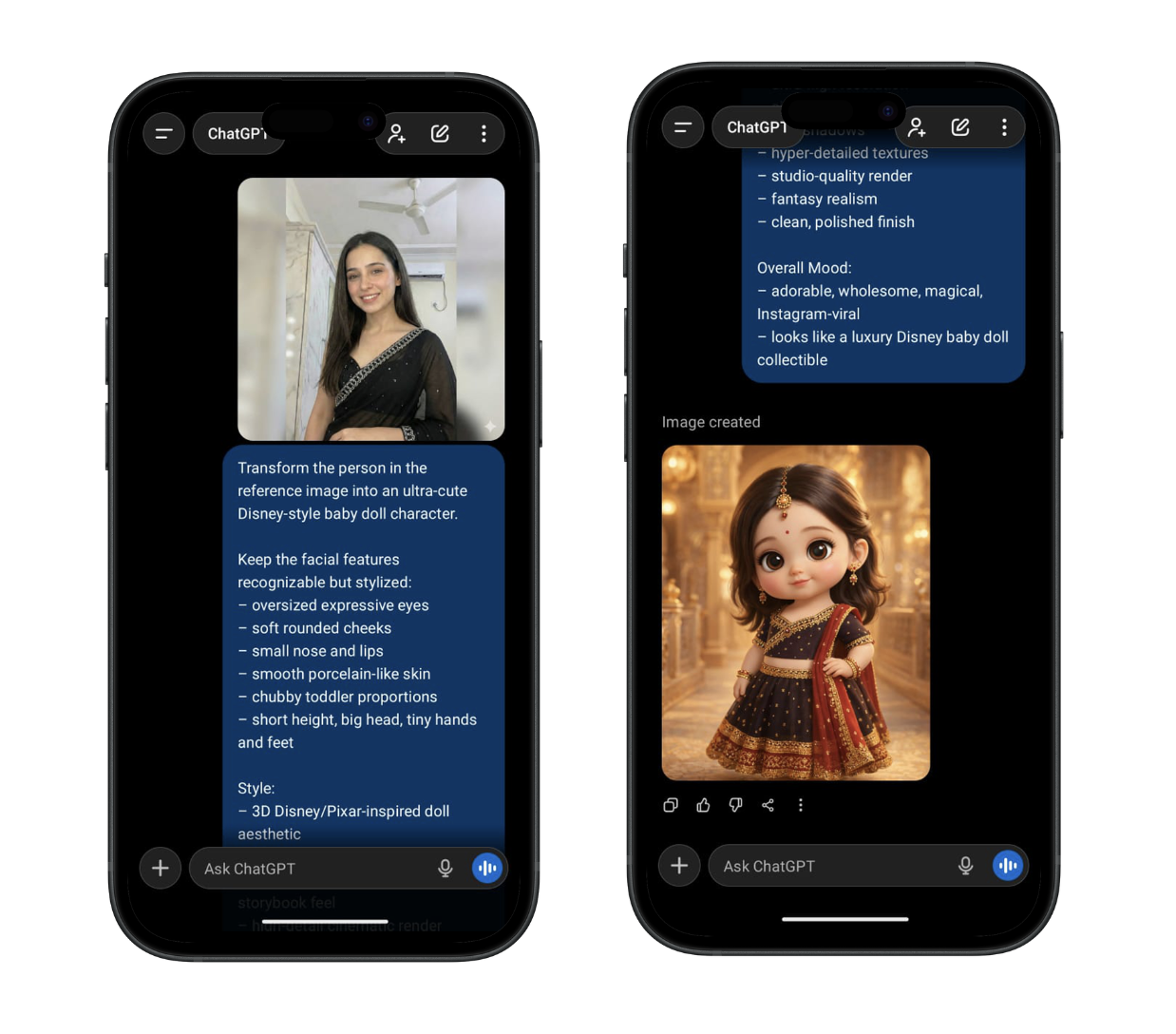
Demo for Doll Image Creation
⬇️ Download and save this image, you’ll need it for animation.
Step 3: Animate the Doll Using Kling AI (Best Quality)
Why Use Kling AI?
Kling AI is currently one of the best AI tools for motion-controlled video generation, offering realistic movement and smooth transitions.
Step 3.1: Download or Open Kling AI
- Download the Kling AI mobile app. Link => https://pro.klingai.com/h5-app
- Or open the Kling AI website.
Step 3.2: Sign In & Subscribe to the Standard Plan
- Price: $6.99 per month
- Credits: 660 credits
- Enough for 5–6 AI motion videos of around 15 seconds each.
🎁 Referral Bonus: Use our referral code 7BW2TUTGLGHV to get 330 extra credits.
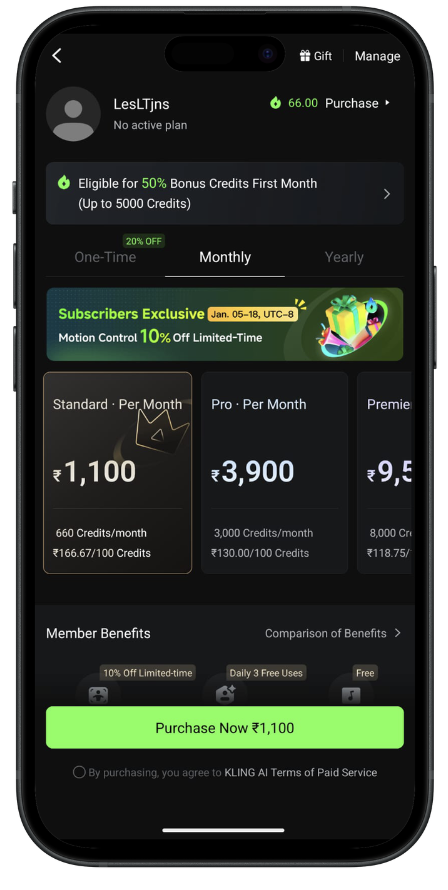
Kling AI Pricing Page
Step 3.3: Generate the Dancing Doll Video
- Go to AI Video
- Select Motion Control
- Upload: The AI doll image The original dancing video (motion reference)
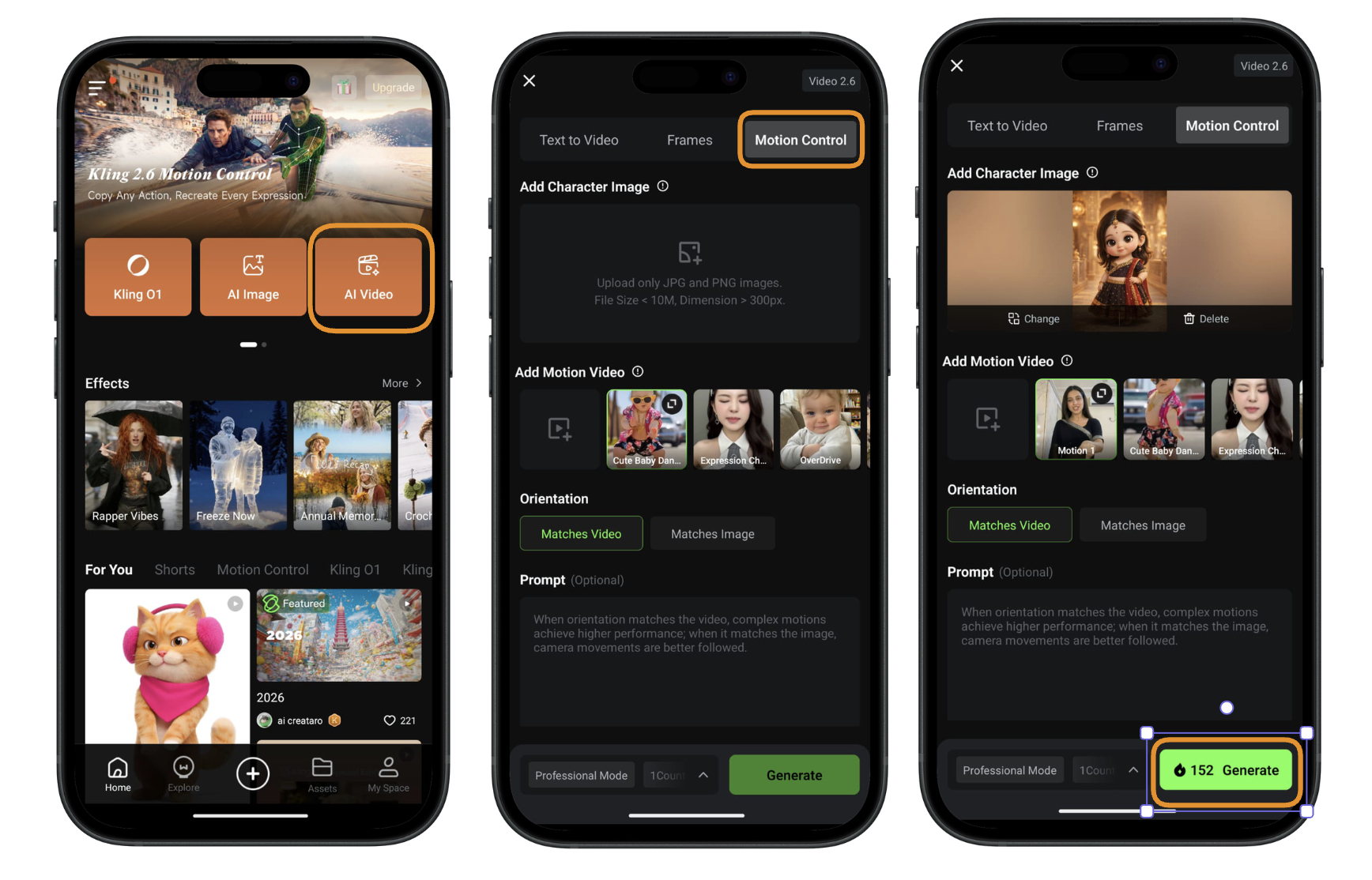
Flow to generate AI video in Kling using motion control
Click generate and your AI doll dancing video will be ready 🎉
Step 4: Post the Video on Instagram Reels
Upload the generated video as a Reel and use:
- Trending music
- Relevant hashtags (
#aidoll #dancingdoll #aivideo #viralreels) - Short, engaging captions
📈 Many creators are seeing viral reach within hours.
Bonus Method: Create Doll Dancing Videos for Free Using Wan.video
If Kling AI feels expensive, you can try Wan.video, a budget-friendly AI video generator.
How to Use Wan.video:
- Go to the Wan.video website. Link => https://wan.video/
- Click Try Now and log in
- Click on the prompt box
- Select the image icon
- From the dropdown, choose Photo Animate
- Upload: The AI doll image The original dancing video
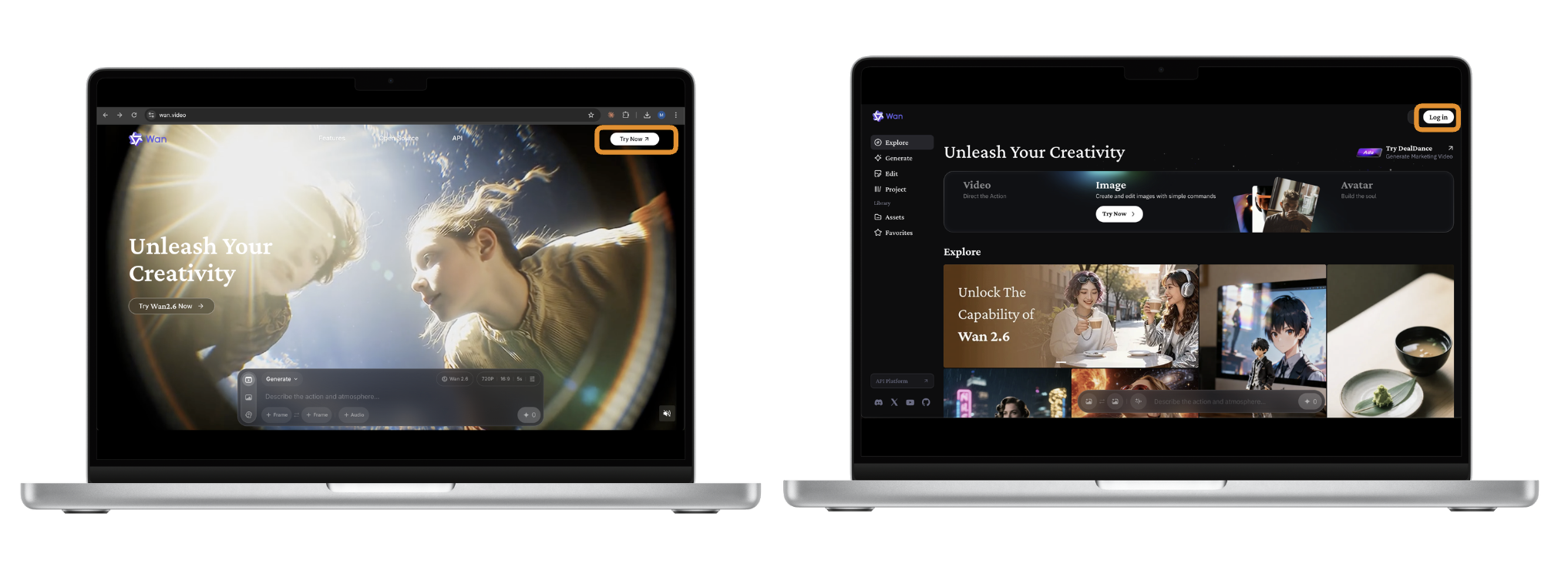
Wan user interface
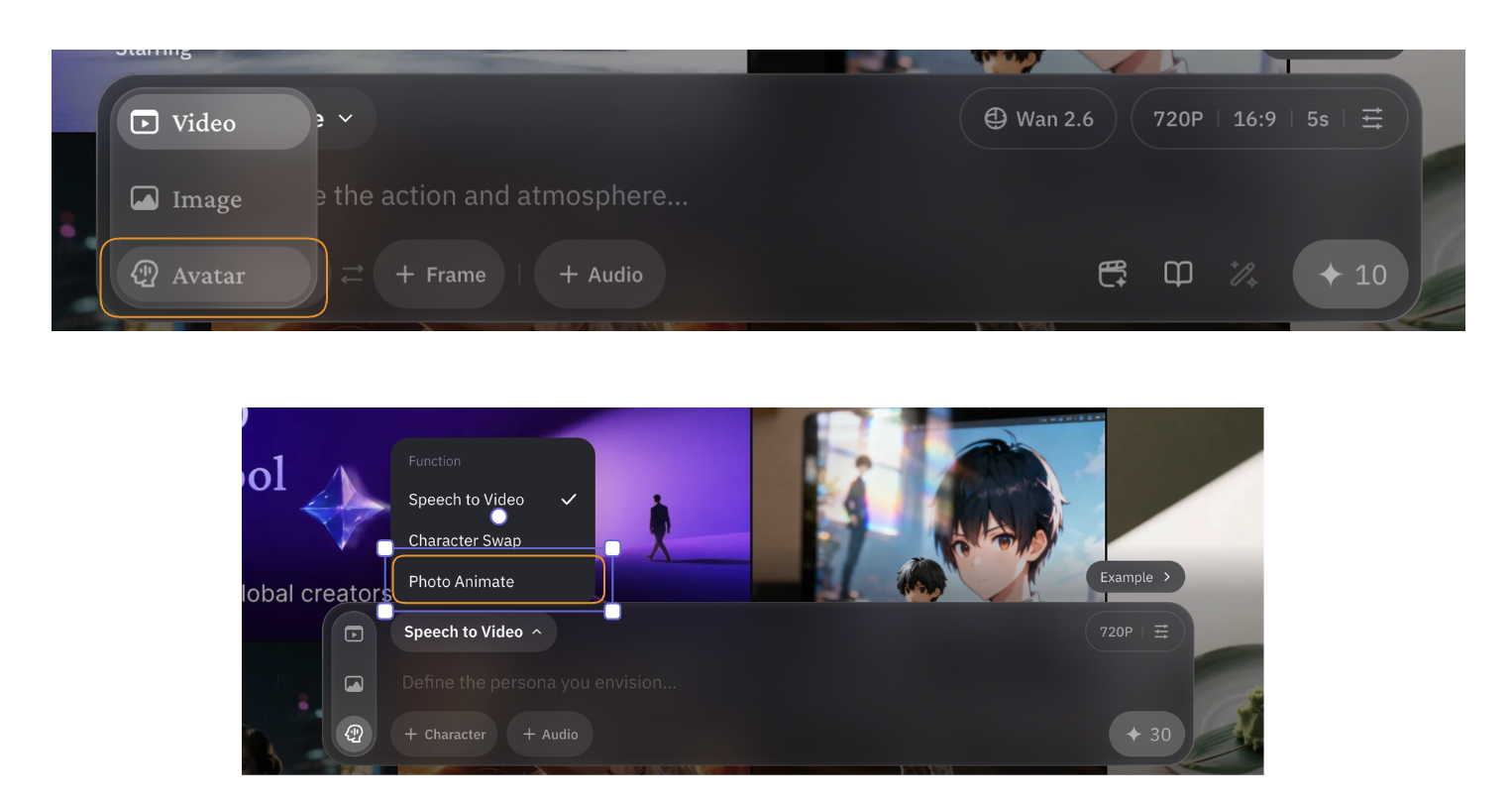
Flow for Wan2.2 Animate
Your animated doll video will be generated automatically 🎬
⚠️ Important Note: Free users may experience long queue times. For faster results, Wan.video offers a paid plan starting at around $5.
Kling AI vs Wan.video – Which Is Better?
Based on our own testing and real usage:
✅ Final Verdict: Kling AI delivers higher-quality, more realistic doll dancing videos, while Wan.video is a decent alternative for experimentation.
Final Thoughts: Start Creating Viral AI Reels Today
AI-generated doll dancing videos are one of the fastest-growing Instagram Reel trends right now. With the right tools and a bit of creativity, anyone can jump in and start creating viral content.
Try both tools, experiment with prompts, and most importantly—post consistently.
🚀 Happy creating, and may your reels go viral!