
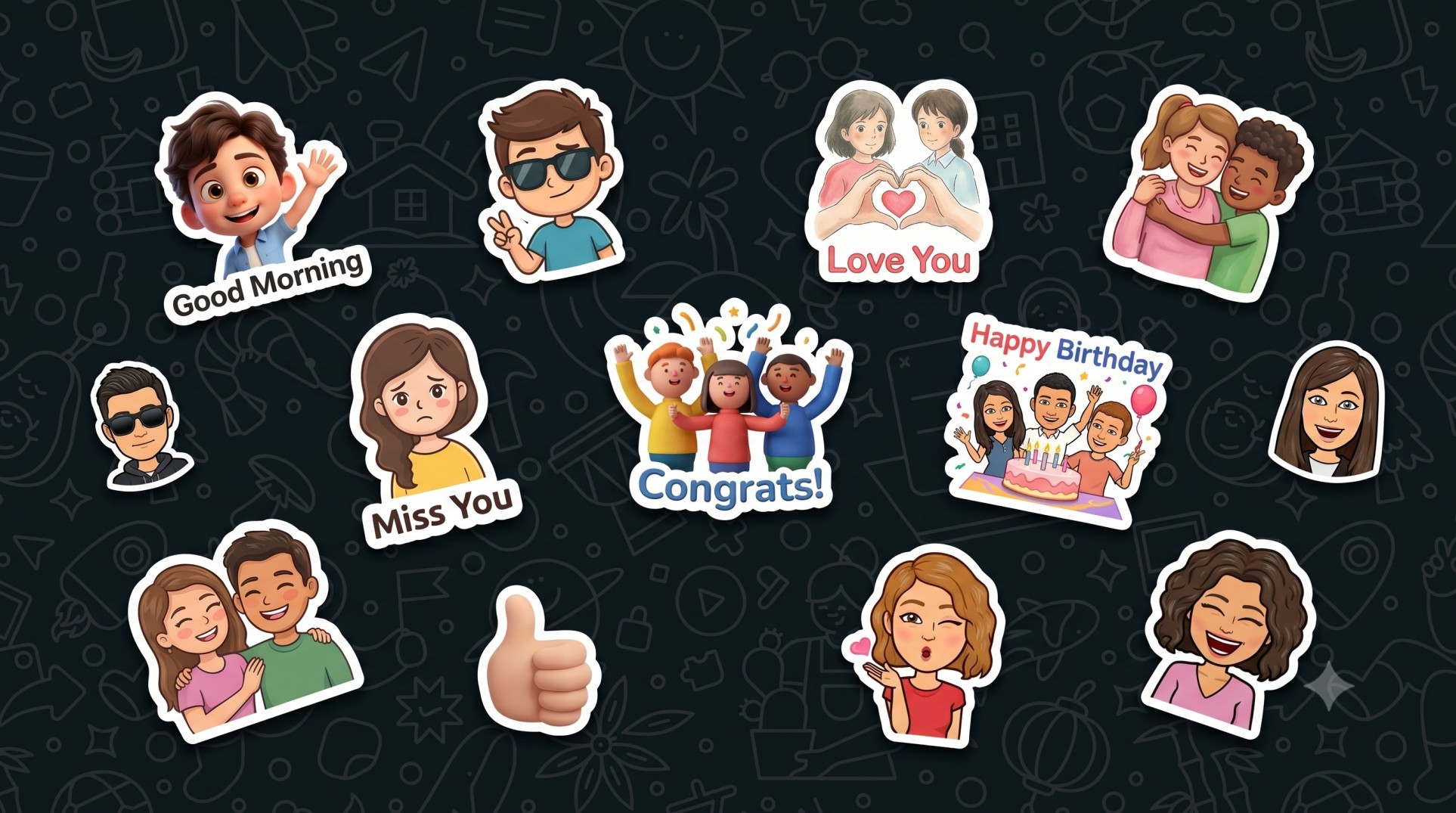
How to Create WhatsApp Stickers From a Photo (Free, in Under 2 Minutes)
Turn any selfie or group photo into a pack of 9 personalized WhatsApp stickers — for free, in 12 art styles, without downloading an app. Here's the easiest way.
Generic sticker packs are everywhere — but nothing lands in a group chat like a sticker of you and your actual friends. The good news: you can create WhatsApp stickers from a photo in under two minutes, for free, without installing a single app.
In this guide, you'll learn exactly how to turn any selfie or group photo into a pack of 9 personalized stickers, how to add them to WhatsApp on both iPhone and Android, and a few tricks to get the best-looking results.
Want to skip ahead? WhatsApp Sticker Maker →
Why Create WhatsApp Stickers From Your Own Photo?
Custom stickers do something a standard pack never can — they make the conversation personal. A few reasons people love them:
- Inside jokes hit harder when the sticker is literally your friend’s face.
- Group chats come alive with reactions that look like the actual people in them.
- Birthdays, festivals, and congratulations feel thoughtful instead of copy-pasted.
- They're shareable — send a friend their own sticker pack as a tiny, delightful gift.
And because the whole thing runs in your browser, there's no app to install, no watermark, and no design skills required.
How to Create WhatsApp Stickers From a Photo (4 Easy Steps)
Here's the entire process, start to finish.
Step 1 — Upload Your Photo
Open the WhatsApp Sticker Maker and upload any clear photo. It works with a single person or a group — the tool keeps each person recognizable. For best results, use a well-lit photo where faces are clearly visible.
Step 2 — Choose an Art Style
Pick from 12 art styles, including:
- Pixar-style 2D Chibi (the fan favorite)
- Studio Ghibli soft, hand-painted look
- Clay / 3D claymation
- Bitmoji-style avatars
- …and 8 more, from comic-book ink to watercolor.
Each style reimagines your photo as a cute, sticker-friendly character that still clearly resembles the real person.
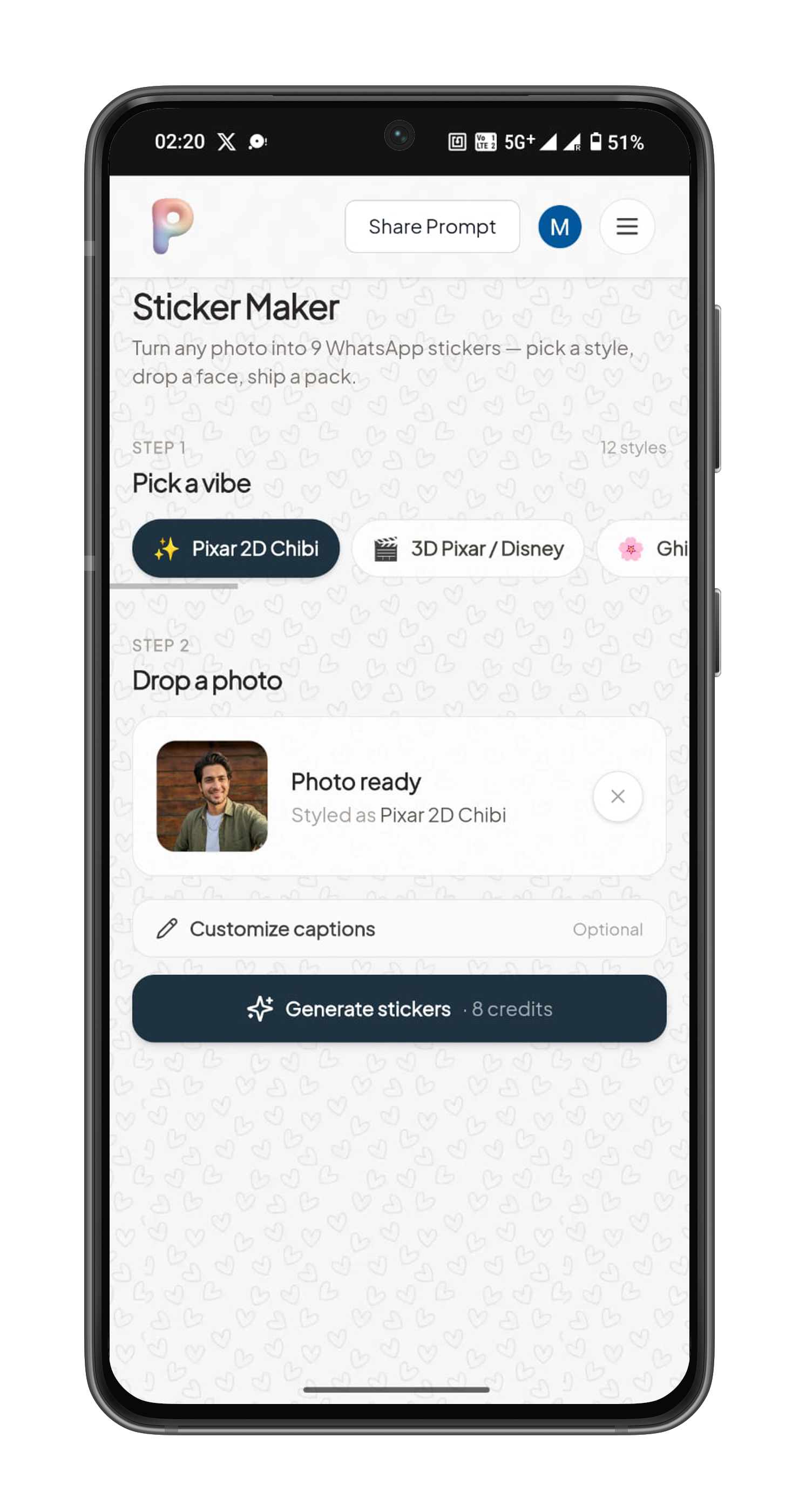
Upload your photo in the sticker maker tool
Step 3 — Customize the Captions (Optional)
Every pack comes with 9 ready-made captions — Good Morning, Hello, Thank You, Miss You, All The Best, Love You, Cool, Happy Birthday, Congrats — each paired with a matching pose and expression.
Want your own? Open Customize captions and rewrite any of the nine. Type your phrase (and optionally describe the mood, like “laughing” or “thumbs up”), and the AI matches the pose to your words. Leave the mood blank and it picks one that fits.
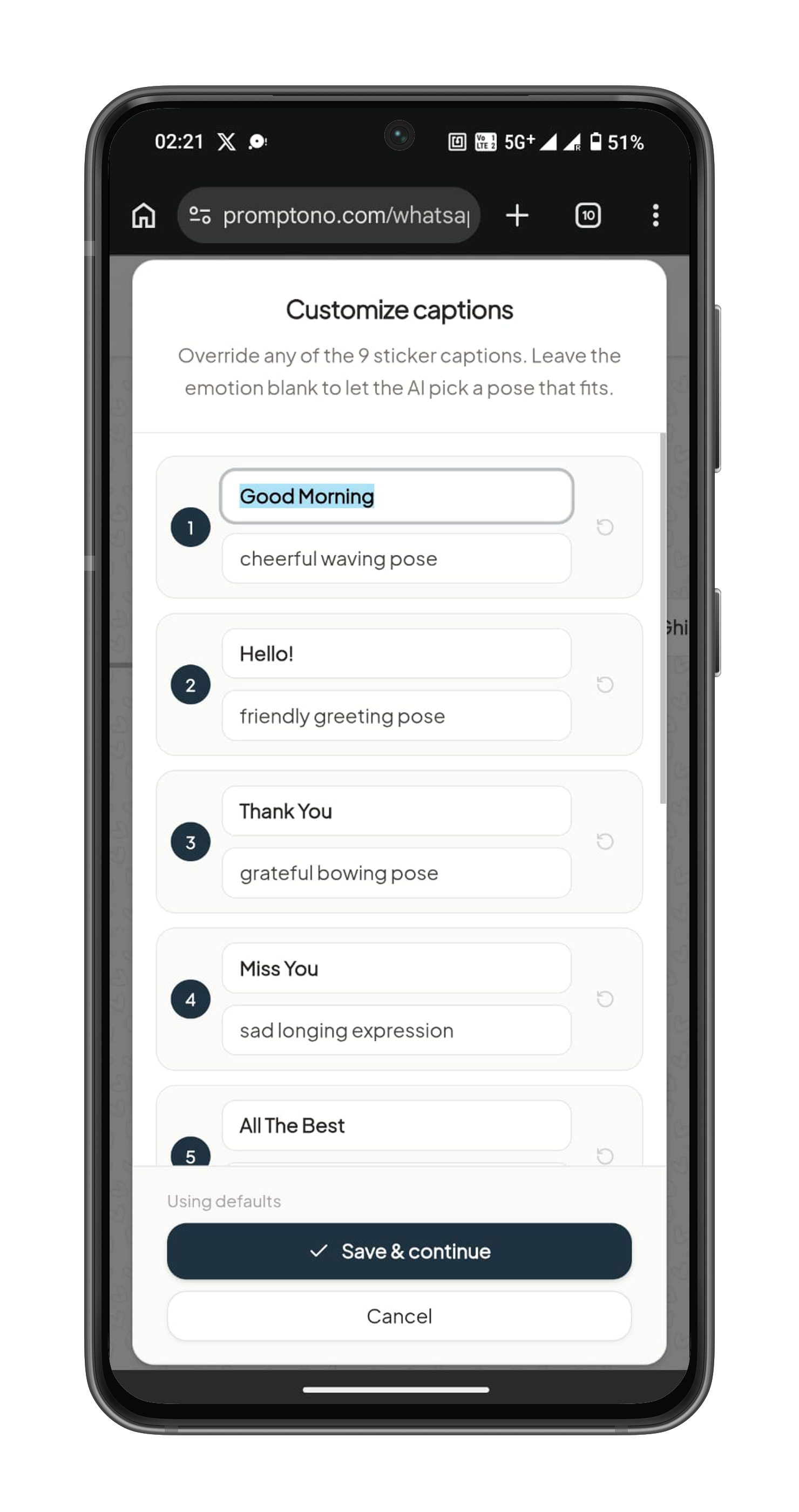
Customize the Captions (Optional)
Step 4 — Generate and Download Your Pack
Hit generate, and in a few seconds you’ll get a full pack of 9 stickers, each with a transparent background — exactly the format WhatsApp needs. Download them individually or grab the whole set as a ZIP.
That's it. You've just created a custom WhatsApp sticker pack from a photo.
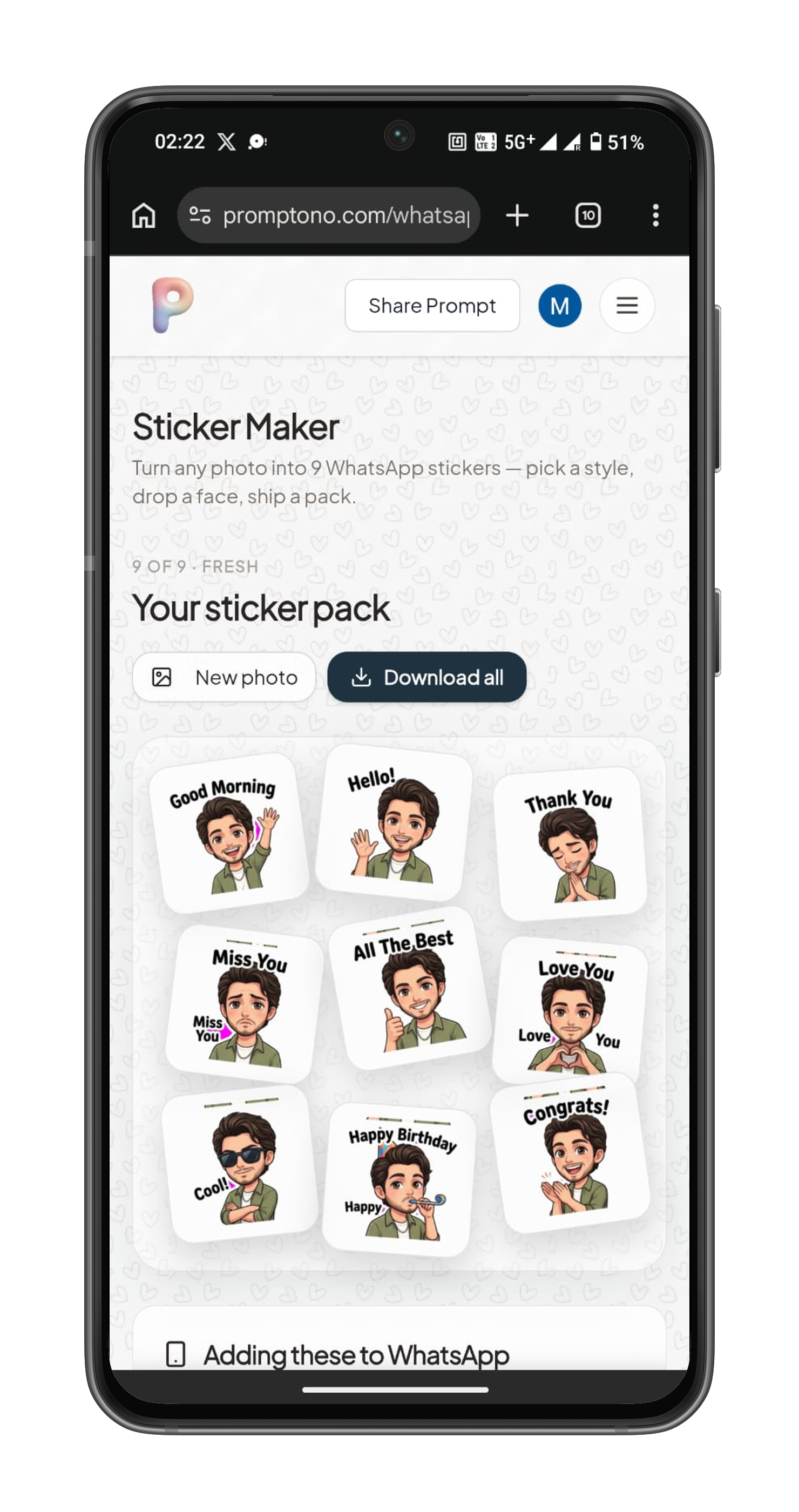
Download Your generated pack
12 Art Styles to Turn Your Photo Into Stickers
The same photo looks completely different depending on the style you pick — which means you can make several distinct packs from one upload. The Pixar-style Chibi look is the most popular for everyday chats, while Ghibli and watercolor feel softer and more artistic. Clay and comic styles read as bold and playful in a busy group chat. Try two or three on the same photo and keep your favorite.
How to Add Custom Stickers to WhatsApp
Once you've downloaded your stickers, here's how to get them into WhatsApp. You have two easy ways to do it — add them directly inside WhatsApp (no extra app needed), or bundle them into a shareable pack with a free helper app.
Option 1 — Add Stickers Directly in WhatsApp (No Extra App)
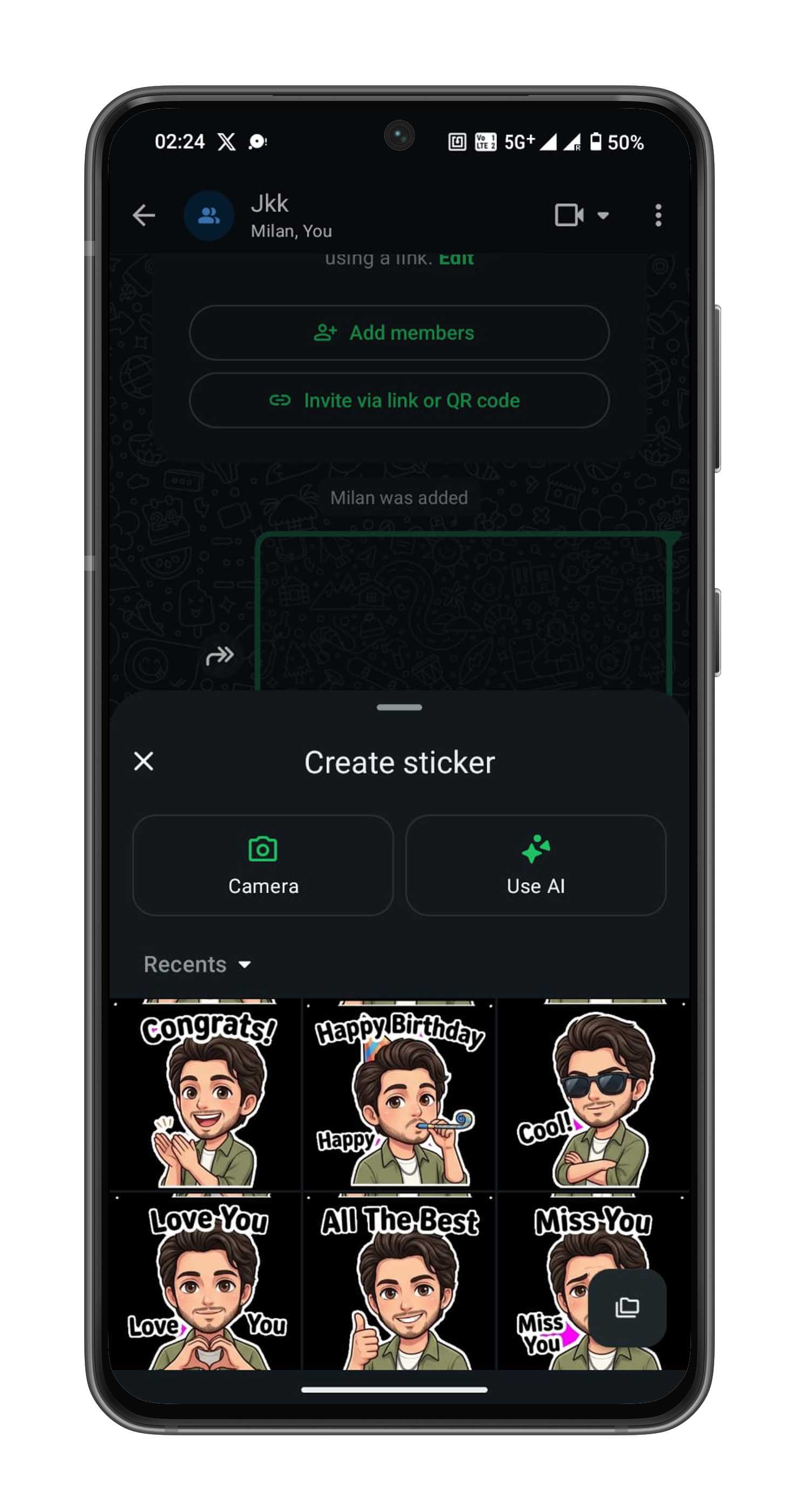
The latest version of WhatsApp lets you turn any image into a sticker right inside the app — no downloads required.
- Open any chat and tap the sticker icon in the message bar.
- Tap the green Create button on the left of the sticker tray.
- Pick your downloaded sticker image from Recents.
- Crop or adjust if you like, then tap Add — the sticker is saved to your tray, ready to send.
- Repeat for each sticker you want to add.
This adds stickers to your personal collection one by one, which is perfect for quick everyday use. It works on both Android and iPhone with an up-to-date version of WhatsApp.
Option 2 — Bundle Them Into a Shareable Pack
Prefer a named pack you can share with friends in a single tap? Use a free sticker-pack app:
On iPhone: Download Sticker Maker Studio, create a new pack, add your sticker images, and tap “Add to WhatsApp.”
On Android: Install Sticker.ly or “Personal stickers for WhatsApp,” import your images into a pack, and tap “Add to WhatsApp.”
WhatsApp Sticker Requirements You Should Know
If you ever make stickers manually, WhatsApp has strict specs. The good news is our tool handles all of this automatically — but it’s useful to know:
- Format: WebP
- Size: 512 × 512 pixels
- Background: transparent
- File size: under 100 KB per sticker
- Pack limit: between 3 and 30 stickers per pack
Tips for Creating the Best WhatsApp Stickers From Your Photos
- Use a sharp, well-lit photo — blurry or dark images produce weaker results.
- Keep faces visible — avoid sunglasses or hands covering the face if you want a strong likeness.
- Groups of 2–4 work best — everyone stays distinct and recognizable.
- Experiment with styles — run the same photo through a few looks before deciding.
Free vs. Paid WhatsApp Sticker Makers — What's the Difference?
Most “free” sticker apps either slap a watermark on your stickers, limit you to a handful of templates, or push constant ads. An AI-powered maker like ours generates a full pack of 9 unique, watermark-free stickers from your own photo — no template hunting, no manual cropping, and no design work. For personalized packs, AI generation simply produces better, more personal results than clip-art-style apps.
Ready to Make Your Own?
You're two minutes away from a sticker pack your group chat will actually use.
Create your WhatsApp stickers from a photo — free: WhatsApp Sticker Maker →